
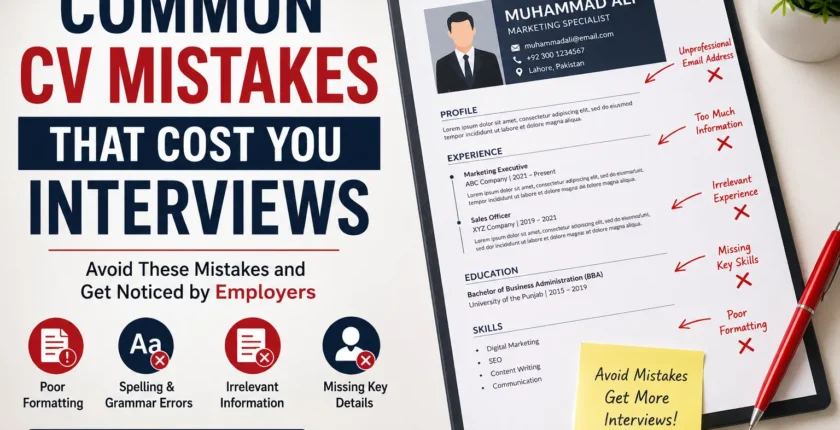
Common CV Mistakes That Cost You Interviews (2026 Guide)
Introduction
A well-written CV is your first opportunity to impress an employer. Before you even attend an interview, your CV decides whether your application moves forward or gets rejected. Unfortunately, many job seekers unknowingly make simple mistakes that reduce their chances of being shortlisted.
Recruiters often spend less than 10 seconds reviewing a CV during the initial screening. If your resume contains formatting errors, irrelevant information, grammar mistakes, or lacks important details, it may never reach the interview stage. If you’re unsure how to build a professional CV from scratch, read our How to Write a CV for Jobs in Pakistan guide.
In this guide, we’ll discuss the most common CV mistakes that cost candidates interviews and explain how to avoid them. Whether you’re a fresh graduate or an experienced professional, these practical tips will help you create a CV that stands out.
Why Your CV Matters
Your CV is more than just a document—it is your personal marketing tool. It highlights your education, work experience, technical skills, achievements, and qualifications.
A professional CV should:
- Clearly present your strengths
- Be easy to read
- Match the job description
- Demonstrate your value to employers
Even highly qualified candidates can lose opportunities because of avoidable CV mistakes.
1. Using the Same CV for Every Job
One of the biggest mistakes is sending the exact same CV to every employer.
Different jobs require different skills. Recruiters look for candidates whose experience matches the position they are hiring for.
Better Approach
Customize your CV for every application by:
- Updating relevant skills
- Using keywords from the job advertisement
- Highlighting related experience
- Adjusting your professional summary
A tailored CV significantly increases your chances of getting shortlisted.
2. Poor CV Formatting
An untidy CV creates a bad first impression.
Common formatting mistakes include:
- Different font styles
- Small or oversized text
- Large paragraphs
- Inconsistent spacing
- Too many colors
- Difficult-to-read layouts
Best Practice
Use:
- Professional fonts like Calibri or Arial
- Font size between 10 and 12 pt
- Clear section headings
- Consistent spacing
- Bullet points instead of long paragraphs
- Plenty of white space
A clean layout helps recruiters find important information quickly.
3. Spelling and Grammar Mistakes
Grammar errors instantly reduce your credibility.
Examples include:
- Misspelled words
- Incorrect punctuation
- Capitalization errors
- Poor sentence structure
Even one spelling mistake can make recruiters question your attention to detail.
Solution
Always:
- Proofread your CV several times
- Use spelling and grammar checking tools
- Ask a friend or mentor to review it before applying
4. Writing an Unclear Professional Summary
Many candidates either skip the professional summary or write something too generic.
Example:
“Looking for a challenging position.”
This tells employers very little.
Better Example
“Results-driven customer service professional with 3 years of experience in client support, communication, and problem-solving, seeking to contribute to a growing organization.”
A strong summary quickly tells employers why you’re a good fit.
5. Including Irrelevant Information
Not everything belongs on your CV.
Avoid adding:
- Personal opinions
- Unrelated hobbies
- Outdated experience
- Irrelevant certifications
- Excessive personal details
Focus only on information that supports your job application.
6. Ignoring Keywords
Many companies use Applicant Tracking Systems (ATS) to filter CVs.
If your resume doesn’t include important keywords from the job description, it may never be seen by a recruiter.
For example, if the job requires the following:
- Project Management
- Microsoft Excel
- Communication Skills
Your CV should naturally include these skills if you have them.
7. Making Your CV Too Long
Recruiters don’t want to read five or six pages.
General recommendation:
- Fresh graduates: 1 page
- Experienced professionals: 2 pages
Include only relevant information.
Quality always beats quantity.
8. Listing Responsibilities Instead of Achievements
Many applicants simply describe what they did.
Example:
- Responsible for customer support.
A stronger statement would be
- Resolved over 95% of customer inquiries while maintaining excellent customer satisfaction.
Achievements demonstrate real impact.
9. Using an Unprofessional Email Address
Your email address creates a first impression.
Avoid addresses like:
- coolboy123@
- princess786@
- gamerking@
Instead, use something professional such as:
Professional contact details increase employer confidence.
10. Missing Contact Information
Some candidates forget to include:
- Phone number
- Professional email
- LinkedIn profile (if available)
- City or location
Without proper contact details, recruiters cannot easily reach you.
Double-check everything before submitting your CV.
11. Adding False Information
Never exaggerate your:
- Experience
- Skills
- Qualifications
- Certifications
- Job titles
Most employers verify candidate information during the hiring process. Before submitting your application, review our Best Skills to Add to Your CV in 2026 article to ensure your skills section matches employer expectations.
Honesty builds trust and protects your professional reputation.
12. Using an Outdated CV
Your CV should always reflect your latest achievements.
Update it regularly by adding:
- New skills
- Certifications
- Recent projects
- Promotions
- Professional accomplishments
Keeping your CV current ensures you’re always ready for new opportunities.
13. Ignoring ATS-Friendly Design
Many modern employers scan resumes using Applicant Tracking Systems.
Avoid:
- Tables
- Text boxes
- Graphics
- Icons
- Complex columns
Instead, use a simple, clean format that ATS software can easily read.
14. Not Quantifying Results
Numbers make your accomplishments more convincing.
Instead of writing:
“Managed sales.”
Write:
“Increased monthly sales by 28% over six months.”
Metrics show measurable success.
15. Submitting Without Final Review
Many applicants rush to apply without checking their CV one last time.
Before sending it:
- Verify formatting
- Check grammar
- Confirm contact details
- Ensure dates are correct
- Save as PDF unless instructed otherwise
A five-minute review can prevent costly mistakes.
Quick CV Checklist Before Applying
Before submitting your CV, make sure:
- It is tailored to the job.
- The formatting is clean and professional.
- There are no spelling or grammar errors.
- Your contact information is correct.
- Achievements are included with measurable results.
- Keywords from the job description are used naturally.
- The CV is ATS-friendly.
- The file is saved as a PDF (if appropriate).
- All information is accurate and up to date.
Final Thoughts
Your CV is often your first introduction to an employer. Even small mistakes can prevent you from reaching the interview stage, regardless of your qualifications. You can also strengthen your online presence by creating a Professional LinkedIn Profile that complements your CV.
By avoiding these common CV mistakes, presenting your experience clearly, and tailoring your application for each role, you can greatly improve your chances of securing interviews.
Remember, a successful CV doesn’t just list your experience—it demonstrates your value. Take the time to review, update, and refine your CV before every job application. A polished, professional resume can make all the difference in helping you land your next opportunity.
FAQ
Q1. What is the biggest CV mistake?
Using the same CV for every job application without tailoring it to the role.
Q2. How long should a CV be?
Fresh graduates should aim for one page, while experienced professionals can use up to two pages.
Q3. Should I include a photo on my CV?
Only if the employer specifically requests one. Otherwise, it’s generally unnecessary.
Q4. Is PDF the best format for a CV?
Yes. PDF preserves formatting and is widely accepted unless the employer requests another format.
Q5. How often should I update my CV?
Update your CV whenever you gain new skills, certifications, work experience, or significant achievements.
Comments are closed.