
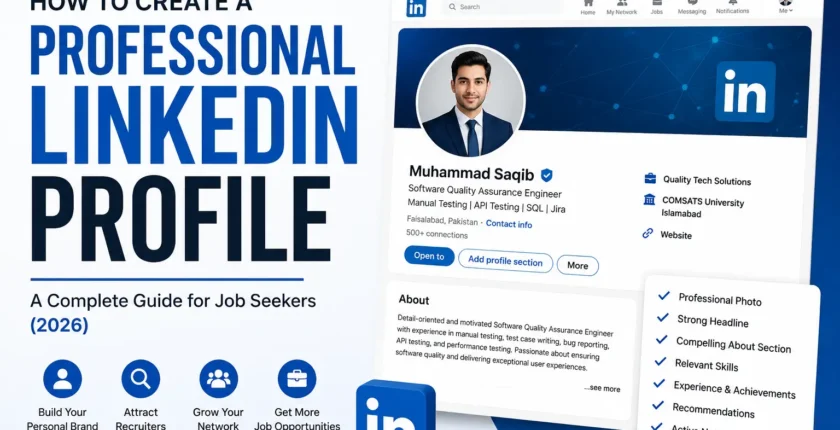
How to Create a Professional LinkedIn Profile (2026 Complete Guide)
Introduction
In today’s competitive job market, having a professional LinkedIn profile is just as important as having a well-written CV. Whether you are a student, fresh graduate, or experienced professional, recruiters often search LinkedIn before inviting candidates for interviews.
A strong LinkedIn profile increases your visibility, builds your personal brand, and helps employers trust your skills and experience. In fact, many companies now recruit directly through LinkedIn instead of waiting for job applications.
This guide explains how to create a professional LinkedIn profile that attracts recruiters and helps you find better job opportunities in Pakistan and around the world. A professional LinkedIn profile should complement your CV. If you haven’t prepared one yet, read our complete guide on How to Write a CV for Jobs in Pakistan (2026 Guide).
Why Is LinkedIn Important?
LinkedIn is the world’s largest professional networking platform with more than one billion users. It allows professionals to:
- Connect with recruiters
- Apply for jobs
- Build a professional network
- Showcase skills and experience
- Share achievements
- Learn from industry experts
Many employers search LinkedIn before contacting candidates, making it one of the most important career tools today. According to insights shared on the LinkedIn Blog, maintaining an active and complete profile can improve your visibility to recruiters.
Step 1: Choose a Professional Profile Photo
Your profile photo creates the first impression.
A good LinkedIn photo should:
- Be clear and high-quality
- Show your face clearly
- Have a simple background
- Include professional attire
- Show a friendly smile
Avoid:
- Selfies
- Group photos
- Casual party pictures
- Low-quality images
A professional photo makes your profile appear more trustworthy.
Step 2: Add a Professional Background Banner
The banner image is often ignored, but it helps strengthen your personal brand.
Choose a banner related to:
- Your profession
- Technology
- Business
- Marketing
- Engineering
- Healthcare
- Education
You can also create a custom banner including your name, profession, and key skills.
Step 3: Write an Attractive Headline
Your headline appears everywhere on LinkedIn.
Instead of writing:
Student
Write something more descriptive, like:
- Software Quality Assurance Engineer | Manual Testing | API Testing | SQL
- SEO Specialist | Link Building Expert | Guest Posting | Outreach
- Digital Marketing Professional | SEO | Content Marketing
- Fresh Graduate | Computer Science | Open to Work
Include important keywords because recruiters search using these terms.
Step 4: Create a Strong About Section
The About section tells recruiters who you are.
Keep it:
- Professional
- Easy to read
- Keyword-rich
- Achievement-focused
Example:
I am a Software Quality Assurance professional with experience in manual testing, bug reporting, API testing, SQL, and software testing methodologies. I enjoy improving software quality and delivering reliable applications. I am always eager to learn new technologies and contribute to high-performing teams.
Keep your summary between 150 and 300 words.
Step 5: Add Your Work Experience
Include each job with:
- Job title
- Company name
- Employment dates
- Responsibilities
- Achievements
Instead of listing duties only, mention measurable results.
Example:
✔ Improved website rankings through SEO strategies.
✔ Increased organic traffic by 40%.
✔ Managed successful outreach campaigns.
Recruiters appreciate measurable achievements.
Step 6: Add Your Education
Include:
- University
- Degree
- Graduation year
- Major subjects
- Relevant achievements
Fresh graduates can also add the following:
- Final Year Project
- Research
- Academic awards
- Student organizations
Step 7: Highlight Your Skills
LinkedIn allows you to add multiple skills.
Popular skills include:
- Communication
- Leadership
- Problem Solving
- Project Management
- Microsoft Excel
- SEO
- Software Testing
- Python
- SQL
- Digital Marketing
Ask colleagues or classmates to endorse your skills.
Step 8: Earn Recommendations
Recommendations increase credibility.
Request recommendations from:
- Managers
- Team leaders
- Professors
- Clients
- Colleagues
Personal recommendations build trust with recruiters.
Step 9: Customize Your LinkedIn URL
Instead of:
linkedin.com/in/user-93839282
Use:
linkedin.com/in/muhammad-saqib
A custom URL looks professional and is easier to share on your CV. If you need step-by-step instructions for editing your profile settings, visit the LinkedIn Help Center.
Step 10: Turn on “Open to Work”
If you’re actively looking for a job:
- Enable Open to Work
- Select preferred job titles
- Choose preferred locations
- Specify employment type
You can also browse thousands of opportunities through LinkedIn Jobs after completing your profile. Recruiters can easily discover your profile. Besides LinkedIn, you can also explore other trusted platforms. Check out our list of the Best Job Search Websites in Pakistan to discover more career opportunities.
Step 11: Add Certifications
Include certifications from recognised platforms.
Examples:
- Microsoft
- HubSpot
- Coursera
- Udemy
- IBM
- Cisco
Certificates demonstrate continuous learning.
Step 12: Showcase Projects
Projects help employers understand your practical experience.
Include:
- Portfolio website
- GitHub projects
- Research work
- Freelance projects
- University assignments
Explain your role and the results achieved.
Step 13: Stay Active on LinkedIn
LinkedIn rewards active users.
Try to:
- Share industry insights
- Comment on professional posts
- Publish articles
- Celebrate achievements
- Connect with professionals
- Follow industry leaders
Consistent activity increases profile visibility.
Step 14: Grow Your Network
Connect with:
- HR professionals
- Recruiters
- Alumni
- Managers
- Industry experts
- Colleagues
Always send a personalised connection request when possible.
Common LinkedIn Mistakes to Avoid
Many job seekers make simple mistakes that reduce their chances of getting noticed.
Avoid these common errors:
- Incomplete profile
- Poor profile photo
- Generic headline
- Spelling mistakes
- No About section
- Missing skills
- No work experience
- No activity
- Unprofessional language
- Outdated information
Updating your profile regularly helps maintain a strong professional image.
Tips for Fresh Graduates
If you don’t have work experience, don’t worry. Focus on:
- Education
- Projects
- Internships
- Volunteer work
- Certifications
- Technical skills
- Soft skills
- Career goals
Recruiters understand that fresh graduates may not have years of experience.
Final Checklist Before Applying for Jobs
Before applying, make sure your profile includes:
- Professional photo
- Background banner
- Strong headline
- Complete About section
- Updated experience
- Education details
- Relevant skills
- Certifications
- Recommendations
- Custom LinkedIn URL
- Contact information
A complete profile significantly improves your chances of appearing in recruiter searches.
Conclusion
Creating a professional LinkedIn profile is one of the smartest investments you can make in your career. It helps recruiters find you, showcases your skills, and increases your chances of receiving interview invitations. Once recruiters start reaching out, prepare yourself by reviewing our Top 25 Job Interview Questions and Best Answers to boost your interview confidence
Keep your profile updated, stay active, build meaningful connections, and continue learning new skills. A polished LinkedIn profile, combined with a strong CV and consistent job applications, can open doors to exciting career opportunities in Pakistan and around the world.
FAQs
1. Is LinkedIn free to use?
Yes. LinkedIn offers a free account with all the essential features needed for networking and job searching. Premium plans provide additional tools but are optional.
2. How complete should my LinkedIn profile be?
Aim for a 100% complete profile with a professional photo, headline, About section, work experience, education, skills, and certifications.
3. Can fresh graduates benefit from LinkedIn?
Absolutely. Fresh graduates can showcase their education, internships, projects, certifications, and skills to attract recruiters.
4. How often should I update my LinkedIn profile?
Update it whenever you gain a new skill, certification, job, project, or achievement. Regular activity also helps improve visibility.
5. Should I include my CV on LinkedIn?
You don’t need to upload your full CV, but your LinkedIn profile should reflect the same accurate information. You can also use LinkedIn’s Easy Apply feature where appropriate.
Comments are closed.