
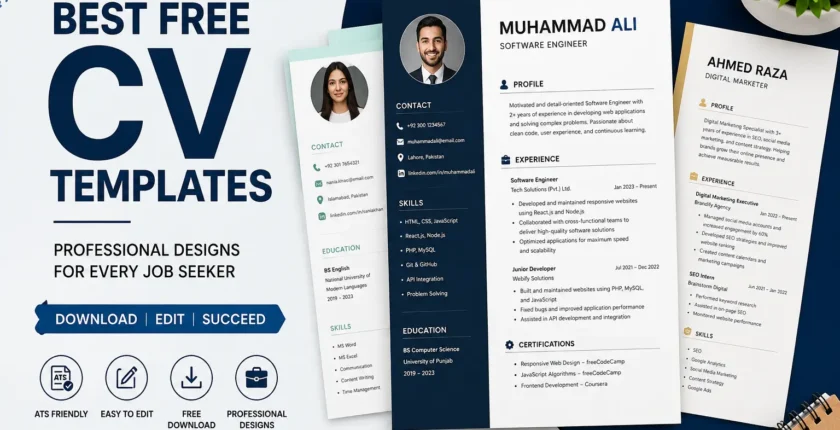
Best Free CV Templates (2026) Professional Designs to Help You Get Hired
Introduction
A well-designed CV can make the difference between getting noticed and getting ignored. In today’s competitive job market, recruiters spend only a few seconds scanning each application before deciding whether to continue reading. That’s why using one of the best free CV templates is an excellent way to present your qualifications professionally without spending money.
Whether you’re a student, fresh graduate, or experienced professional, choosing the right CV template helps organize your information, improve readability, and increase your chances of landing interviews. The best part is that many high-quality templates are available for free and can be customized to suit any industry.
In this guide, we’ll explore the best free CV templates, their benefits, how to choose the right one, and tips to make your CV stand out from the competition.
Why Choosing the Right CV Template Matters
Your CV is often the first impression an employer has of you. Even if you have excellent qualifications, a poorly formatted CV can reduce your chances of being shortlisted.
A professional CV template offers several advantages:
- Makes your CV easy to read.
- Highlights your skills and experience.
- Creates a professional first impression.
- Improves compatibility with Applicant Tracking Systems (ATS).
- Saves time when updating your CV.
To understand what hiring managers expect from a resume, read our guide on What Recruiters Look for in a CV. A clean and organized layout allows recruiters to quickly find the information they need, increasing your chances of moving to the next stage of the hiring process.
Features of the Best Free CV Templates
Not all CV templates are created equal. The best templates have a combination of simplicity, professionalism, and functionality.
1. ATS-Friendly Design
Many employers use Applicant Tracking Systems (ATS) to filter applications before a recruiter even sees them. Choose templates with simple formatting, clear headings, and standard fonts to ensure your CV passes ATS screening.
2. Professional Layout
A clean layout with sufficient white space makes your CV easy to scan. Avoid cluttered designs or excessive graphics.
3. Easy Customization
The best free CV templates allow you to edit colors, fonts, and sections without affecting the overall structure.
4. Readable Fonts
Use professional fonts such as
- Calibri
- Arial
- Cambria
- Helvetica
- Times New Roman
Keep font sizes between 10 and 12 points for body text and slightly larger for headings.
Best Free CV Templates for Every Job Seeker
Professional CV Template
This template is perfect for office jobs, banking, administration, education, and government positions. It focuses on content rather than decorative elements.
Modern CV Template
Ideal for IT professionals, software developers, digital marketers, and startup employees. It includes a sleek design while remaining ATS-friendly.
Student CV Template
Students and fresh graduates often have limited work experience. This template highlights education, projects, internships, certifications, and extracurricular activities.
Executive CV Template
Experienced professionals should choose templates that emphasize achievements, leadership roles, and measurable results.
Creative CV Template
Graphic designers, photographers, video editors, and content creators can use creative templates with subtle design elements that showcase their personality without overwhelming recruiters.
Essential Sections Every CV Should Include
Regardless of the template you choose, every CV should contain these important sections.
Contact Information
Include:
- Full Name
- Mobile Number
- Professional Email Address
- LinkedIn Profile
- City and Country
Professional Summary
Write a short summary that highlights your experience, skills, and career objectives. Keep it concise and relevant to the position.
Work Experience
List your work experience in reverse chronological order. Mention your job title, company name, employment dates, and key achievements using bullet points.
Education
Include your degree, institution, graduation year, and any academic achievements relevant to the role.
Skills
Separate technical skills from soft skills.
Technical Skills
- Microsoft Office
- SQL
- HTML/CSS
- Python
- Digital Marketing
- Data Analysis
Soft Skills
- Communication
- Leadership
- Teamwork
- Time Management
- Problem Solving
Not sure which abilities employers value most? Explore our article on Best Skills to Add to Your CV in 2026 to strengthen your resume.
Certifications
Include certifications that strengthen your profile, such as Google, Microsoft, AWS, or industry-specific credentials.
How to Choose the Best Free CV Template
Selecting the right template depends on your profession.
- Corporate jobs require simple and formal layouts.
- IT jobs benefit from modern templates with a dedicated skills section.
- Creative roles allow for more visually appealing designs.
- Government jobs usually require traditional formatting.
Always prioritize readability over design.
Common CV Mistakes to Avoid
Even with the best template, mistakes can hurt your chances of getting hired.
Avoid these common errors:
- Using multiple font styles.
- Adding unnecessary graphics.
- Writing long paragraphs.
- Including irrelevant information.
- Using outdated contact details.
- Submitting a CV with spelling or grammar mistakes.
- Failing to tailor your CV for each job application.
Proofreading your CV before submission is essential.Before sending your application, check out Common CV Mistakes That Cost You Interviews to avoid errors that could reduce your chances of getting shortlisted.
Tips to Make Your CV Stand Out
To maximize the effectiveness of your CV:
- Customize it for every job application.
- Include keywords from the job description.
- Quantify achievements where possible.
- Keep your CV one or two pages long.
- Use action verbs such as “Managed,” “Developed,” “Improved,” and “Led.”
- Save your CV as a PDF unless the employer requests another format.
These simple practices can significantly improve your chances of securing interviews.
Where to Find the Best Free CV Templates
Several trusted platforms provide free CV templates. The Europass CV Builder offers free, professional CV templates that are widely recognized across Europe. that are easy to customize and download. Choose templates designed for ATS compatibility and professional presentation. Many of these platforms offer Microsoft Word and PDF formats, making them suitable for most job applications. If you prefer stylish and customizable layouts, Canva Free Resume Templates offers hundreds of professional designs for different industries.
Final Thoughts
Using one of the best free CV templates is one of the smartest decisions you can make during your job search. A professional template not only enhances the appearance of your CV but also improves readability and increases your chances of passing ATS screening.
Remember that while a good template is important, your content matters even more. Tailor your CV for each application, highlight measurable achievements, and keep the design clean and professional. By combining a strong template with compelling content, you’ll create a CV that captures recruiters’ attention and helps you secure more interviews.
Frequently Asked Questions
What is the best free CV template?
The best free CV template is one that is clean, professional, ATS-friendly, and easy to customize for your target job.
Are free CV templates accepted by employers?
Yes. Most employers focus on the quality of your experience and the organization of your CV rather than whether the template is free or paid.
How long should a CV be?
Fresh graduates should aim for one page, while experienced professionals can use two pages if necessary.
Which CV format is most recommended?
The reverse chronological format is the most widely accepted because it clearly showcases your most recent experience first.
Can I use the same CV template for every job?
Yes, but you should always tailor the content, skills, and keywords to match each job description for better results.